 Pb28
Pb28 PHP Change Password Script
The change password feature in a web application is to let the user change their old password at some periodic interval. It makes the user protect the sensitive pages from hackers.
Some web application fixes some expiration period for users’ password. It forces the user to change the password once the expiration period is elapsed. For example, some banking applications force users to change their password for security.
We are going to see an example to change the password with Javascript validation by, accessing the MySQL table.
HTML Code for Change Password Form
This HTML code shows the changed password.
<html>

<head>

<title>Change Password</title>

<link rel="stylesheet" type="text/css" href="css/style.css" />

<link rel="stylesheet" type="text/css" href="css/form.css" />

</head>

<body>

    <div class="Pb28 Master-container tile-container">

        <form name="frmChange" method="post" action=""

            onSubmit="return validatePassword()">


            <div class="validation-message text-center"><?php if(isset($message)) { echo $message; } ?></div>

            <h2 class="text-center">Change Password</h2>

            <div>

                <div class="row">

                    <label class="inline-block">Current Password</label>

                    <span id="currentPassword"

                        class="validation-message"></span> <input

                        type="password" name="currentPassword"

                        class="full-width">


                </div>

                <div class="row">

                    <label class="inline-block">New Password</label> <span

                        id="newPassword" class="validation-message"></span><input

                        type="password" name="newPassword"

                        class="full-width">


                </div>

                <div class="row">

                    <label class="inline-block">Confirm Password</label>

                    <span id="confirmPassword"

                        class="validation-message"></span><input

                        type="password" name="confirmPassword"

                        class="full-width">


                </div>

                <div class="row">

                    <input type="submit" name="submit" value="Submit"

                        class="full-width">

                </div>

            </div>


        </form>

    </div>

</body>

</html>
All the fields are mandatory and the newPassword and confirmPassword should be the same. We are using Javascript validation. The validation function is,
function validatePassword() {

	var currentPassword, newPassword, confirmPassword, output = true;


	currentPassword = document.frmChange.currentPassword;

	newPassword = document.frmChange.newPassword;

	confirmPassword = document.frmChange.confirmPassword;


	if (!currentPassword.value) {

		currentPassword.focus();

		document.getElementById("currentPassword").innerHTML = "required";

		output = false;

	}

	else if (!newPassword.value) {

		newPassword.focus();

		document.getElementById("newPassword").innerHTML = "required";

		output = false;

	}

	else if (!confirmPassword.value) {

		confirmPassword.focus();

		document.getElementById("confirmPassword").innerHTML = "required";

		output = false;

	}

	if (newPassword.value != confirmPassword.value) {

		newPassword.value = "";

		confirmPassword.value = "";

		newPassword.focus();

		document.getElementById("confirmPassword").innerHTML = "not same";

		output = false;

	}

	return output;

}
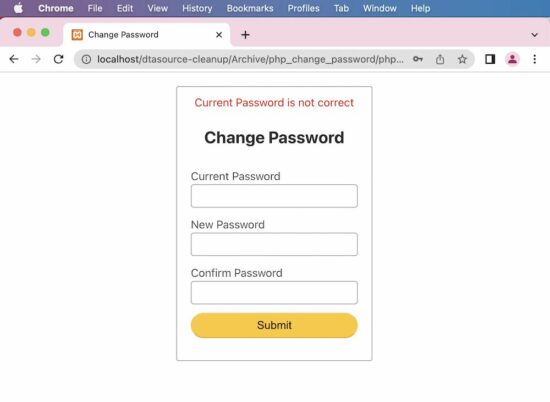
PHP Change Password Script
After the successful form submits, the PHP code will access MySQL to get the current password. If this database value is matched with the form’s current password value, then the password will be changed. The PHP code is,
<?php

session_start();

$_SESSION["userId"] = "1";

$conn = mysqli_connect("localhost", "root", "", "password_change");

if (count($_POST) > 0) {


    $sql = "SELECT * FROM users WHERE userId= ?";

    $statement = $conn->prepare($sql);

    $statement->bind_param('i', $_SESSION["userId"]);

    $statement->execute();

    $result = $statement->get_result();

    $row = $result->fetch_assoc();


    if (! empty($row)) {

        $hashedPassword = $row["password"];

        $password = PASSWORD_HASH($_POST["newPassword"], PASSWORD_DEFAULT);

        if (password_verify($_POST["currentPassword"], $hashedPassword)) {

            $sql = "UPDATE users set password=? WHERE userId=?";

            $statement = $conn->prepare($sql);

            $statement->bind_param('si', $password, $_SESSION["userId"]);

            $statement->execute();

            $message = "Password Changed";

        } else

            $message = "Current Password is not correct";

    }

}

?>