 Pb28
Pb28 jQuery Table Row Column Highlight on Hover
This jQuery tutorial helps to highlight table row and column on the mouseover event. There are several event handling functions in jQuery to highlight table row/column.
In this tutorial, we are using jQuery hover() to pass functions to be called on mouse over, mouse out events. These functions are used to add/remove CSS class selectors to highlight table row/column.
HTML Table Row Column
We are using this table for highlighting row and column using jQuery.
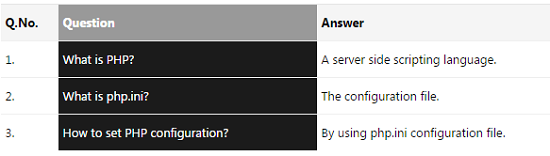
html
<table class="tutorial-table">

  <thead>

	  <tr>

		<th class="table-header" width="10%">Q.No.</th>

		<th class="table-header">Question</th>

		<th class="table-header">Answer</th>

	  </tr>

  </thead>

  <tbody>

	  <tr class="table-row">

		<td>1.</td>

		<td>What is PHP?</td>

		<td>A server side scripting language.</td>

	  </tr>

	  <tr class="table-row">

		<td>2.</td>

		<td>What is php.ini?</td>

		<td>The configuration file.</td>

	  </tr>

	  <tr class="table-row">

		<td>3.</td>

		<td>How to set PHP configuration?</td>

		<td>By using php.ini configuration file.</td>

	  </tr>

  </tbody>

</table>
jQuery Row Column Highlight on Hover
This jQuery code is used to invoke hover() on the mouseover event of the table row(tr) and table-head(TH) elements. This will execute jQuery highlight functions by changing the corresponding CSS properties.
javascript
$(document).ready(function() {

		$('.table-row').hover(function() {

			$(this).addClass('current-row');

		}, function() {

			$(this).removeClass('current-row');

		});


		$("th").hover(function() {

			var index = $(this).index();

			$("th.table-header, td").filter(":nth-child(" + (index+1) + ")").addClass("current-col");

			$("th.table-header").filter(":nth-child(" + (index+1) + ")").css("background-color","#999")

		}, function() {

			var index = $(this).index();

			$("th.table-header, td").removeClass("current-col");

			$("th.table-header").filter(":nth-child(" + (index+1) + ")").css("background-color","#F5F5F5")

		});

	});