 Pb28
Pb28 jQuery Menu Dropdown
This tutorial will show a dropdown menu using jQuery and CSS. By adding the dropdown feature to the menu, we can clean our menu area by controlling the display of the primary and submenu lists. Check this tutorial for multilevel dropdown using simple CSS and HTML only.
Initially, we show the list of main menu items to the browser. On the mouse over the event of each main menu, it triggers the jQuery function to show the corresponding submenu.
1. Create HTML for jQuery Menu Bar
The HTML code for the menu list is,
html
<div id="menu">

	<div class="mainmenu" id="popular">

		<a href="#">Popular Toys</a>

		<div class="submenu">

			<ul>

				<li><a href="#">Video Games</a></li>

				<li><a href="#">Barbies</a></li>

				<li><a href="#">Teddy Bear</a></li>

				<li><a href="#">Golf Set</a></li>

			</ul>

		</div>

	</div>

	<div class="mainmenu" id="recent">

		<a href="#">Recent Toys</a>

		<div class="submenu">

			<ul>

				<li><a href="#">Yoyo</a></li>

				<li><a href="#">Doctor Kit</a></li>

				<li><a href="#">Puzzles</a></li>

				<li><a href="#">Uno Cards</a></li>

			</ul>

		</div>

	</div>

	<div class="mainmenu" id="category">

		<a href="#">Toys Category</a>

		<div class="submenu">

			<ul>

				<li><a href="#">Battery Toys</a></li>

				<li><a href="#">Remote Toys</a></li>

				<li><a href="#">Magnet Toys</a></li>

				<li><a href="#">Soft Toys</a></li>

			</ul>

		</div>

	</div>

</div>
Add Styles to jQuery Menu Dropdown
We are applying styles to the menu item to control the position of the dropdown menu. Initially, the submenu items are hidden by using CSS.
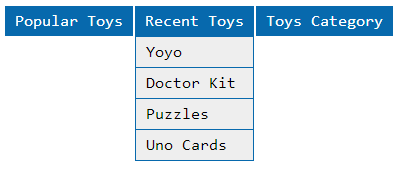
css
body {

font-family: consolas;

}

.submenu {

display: none;

}

.mainmenu {

float: left;

margin: 1px;

line-height: 30px;

background-color: #0769AD;

}

.mainmenu a{

margin: 10px;

color: #FFFFFF;

text-decoration: none;

}

.submenu ul{

list-style: none;

margin: 0;

padding: 0px;

}

.submenu li {

background-color: #EEEEEE;

margin:1px;

line-height: 30px;

}

.submenu li a{

color: #000000;

}
jQuery function for Displaying Dropdown Menu
We have a function to call jQuery show hide to show the dropdown based on the main menu. The function is,
javascript
var showDropDown = function(doc) {

	var id = doc.id;

	$("#" + id + " .submenu").show();

}

var hideDropDown = function(doc) {

	var id = doc.id;

	$("#" + id + " .submenu").hide();

}
View DemoDownload