 Pb28
Pb28 jQuery Form Validation to Restrict Multiple URL
In jQuery, it is effortless to restrict the user from entering more than one URL via a form input. By validating this, we can avoid spam content with more hyperlinks.
In the previous tutorial, we have seen the jQuery example to validate the contact form. This tutorial uses jQuery match() to check the number of URL occurrences.
We pass a regex pattern to find a URL match among the input string for this jQuery function.
HTML Text-Area Input
This code shows the HTML text area input to the user. After entering text data, the jQuery regex match will be called to check URL occurrences.
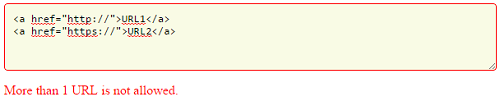
<textarea id="text-content" cols="80" rows="4"></textarea>

<div>

	<input type="button" name="btnValidate" id="btnValidate" value="Submit" onClick="validate()"/>

	<label id="validation-message"></label>

</div>
jQuery URL Match
The jQuery regex match function will return the number of URLs the user enters. We are checking for the URLs starting with HTTP://, https://, or FTP://. If the count exceeds 1, then this code will return an error message.
function validate() {

    var num_url_match = $('#text-content').val().toLowerCase().match(/(<a href="([^"]+)">([^$|\s+]*)<\/a>)/g);

	if(num_url_match.length > 1) {

        $("#validation-message").html(" More than 1 URL is not allowed.");

		$("#validation-message").css("color","#FF0000");

		$("#text-content").css("border-color","#FF0000");

    } else {

        $("#validation-message").html("");

		$("#validation-message").html(" " +num_url_match.length+ " URL is found.");

		$("#validation-message").css("color","#2FC332");

		$("#text-content").css("border-color","#F0F0F0");

    }

}