 Pb28
Pb28 jQuery Custom Dropdown with Checkbox
In this tutorial, I will present about creating a custom dropdown box that has a list of options with checkboxes. In this custom UI field, the multi-select option is also available.
I have managed to develop this with just a few lines of code by using jQuery functions like toggle(), show(), and hide().
In this example, I have used jQuery to toggle the dropdown. Each option contains a checkbox and a caption. On clicking the checkbox or its caption, the option item is selected. The selected options are displayed in the browser when the user submits the form.
In a previous tutorial, we saw how to post values selected from a checkbox combo to PHP.
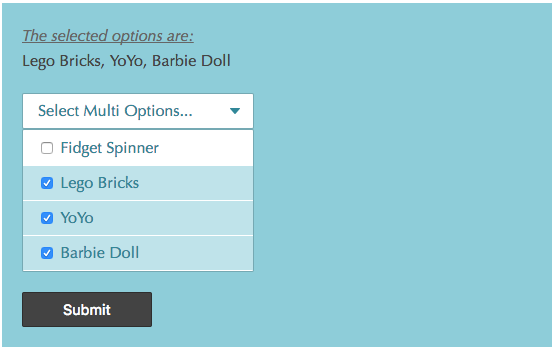
Custom Dropdown HTML
The following HTML code is used to create the custom dropdown. In this example, I have used static options for the custom dropdown. You can read options from databases or other resources to display dynamic options.
I have an options header and options list container in this HTML. Initially, the options list is hidden, and its display is toggled on clicking the options header element.
<div id="checkbox-dropdown-container">

	<form id="fromCustomSelect" name="fromCustomSelect" action=""

		method="post">

		<div>

			<?php

				    if(!empty($_POST["toys"])) {

				    $selectedValues = implode(", ", $_POST["toys"]);

				?>

			<div class="result-list">

				<div class="result-list-heading">The selected options are:</div>

				<div>

					<?php echo $selectedValues; ?>

				</div>

			</div>

			<?php

				    }

				?>

			<div class="custom-select" id="custom-select">Select Multi

				Options...</div>

			<div id="custom-select-option-box">

				<div class="custom-select-option">

					<input onchange="toggleFillColor(this);"

						class="custom-select-option-checkbox" type="checkbox"

						name="toys[]" value="Fidget Spinner"> Fidget Spinner

				</div>

				<div class="custom-select-option">

					<input onchange="toggleFillColor(this);"

						class="custom-select-option-checkbox" type="checkbox"

						name="toys[]" value="Lego Bricks"> Lego Bricks

				</div>

				<div class="custom-select-option">

					<input onchange="toggleFillColor(this);"

						class="custom-select-option-checkbox" type="checkbox"

						name="toys[]" value="YoYo"> YoYo

				</div>

				<div class="custom-select-option">

					<input onchange="toggleFillColor(this);"

						class="custom-select-option-checkbox" type="checkbox"

						name="toys[]" value="Barbie Doll"> Barbie Doll

				</div>

			</div>

		</div>

		<button type="submit" class="search btn">Submit</button>

	</form>

</div>
jQuery Functions for Custom Multi-Select Dropdown
In this jQuery script, I have added functions to handle the custom dropdown toggle event and to select options. To simulate the default HTML dropdown, I have added jQuery functions to enable the checkbox to select options by clicking the caption of the option.
<script src="jquery-3.2.1.min.js"></script>

<script>

	$("#custom-select").on("click", function() {

		$("#custom-select-option-box").toggle();

	});

	function toggleFillColor(obj) {

		$("#custom-select-option-box").show();

		if ($(obj).prop('checked') == true) {

			$(obj).parent().css("background", '#c6e7ed');

		} else {

			$(obj).parent().css("background", '#FFF');

		}

	}

	$(".custom-select-option").on("click", function(e) {

		var checkboxObj = $(this).children("input");

		if ($(e.target).attr("class") != "custom-select-option-checkbox") {

			if ($(checkboxObj).prop('checked') == true) {

				$(checkboxObj).prop('checked', false)

			} else {

				$(checkboxObj).prop("checked", true);

			}

		}

		toggleFillColor(checkboxObj);

	});


	$("body")

			.on(

					"click",

					function(e) {

						if (e.target.id != "custom-select"

								&& $(e.target).attr("class") != "custom-select-option") {

							$("#custom-select-option-box").hide();

						}

					});

</script>