 Pb28
Pb28 Facebook Style URL Extract with PHP and jQuery AJAX
In PHP, URL extraction can be done in many ways. In the previous tutorial, we have seen how to extract the remote content from a given URL using the PHP cURL script.
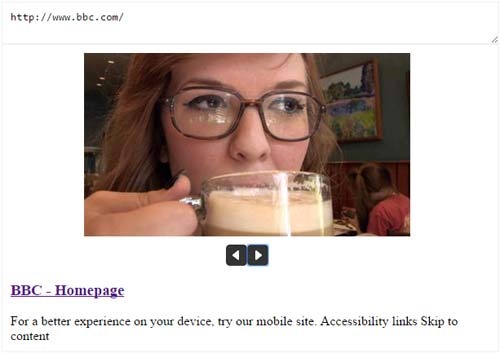
In this tutorial, we will do the Facebook-like URL extract using jQuery and PHP.
We are using SimpleHTMLDOM parser class for parsing the HTML DOM elements of the remote content. We are sending the URL via jQuery AJAX to parse the title, description, and images, if any.
After parsing, we print results with the extracted content.
HTML Input to Call jQuery URL Extract
This code has a text area that triggers the URL extract on its key-up event.
<div id="frm-extract">

    <textarea id="url" placeholder="Enter the URL" onKeyup="extractURL()"></textarea>

    <div id="output"></div>

</div>
jQuery URL Extract Function
This function sends a URL to a PHP page to call SimpleHTMLDOM parser to extract the remote content. On successful extract, this function will slide down the results.
function extractURL() {

$.ajax({

	url: "url_extract.php",

	data:'url='+$('#url').val(),

	type: "POST",

	beforeSend:function(data){

		$("#url").css("background","#FFF url(LoaderIcon.gif) no-repeat right center");

	},

	success: function(responseData){

		$("#output").html(responseData);

		$("#output").slideDown();

		$("#url").removeAttr("onkeyup");

		$("#url").css("background","");

	}

});

}
PHP Remote URL Extract
We have to include SimpleHTMLDOM parser class in this PHP file. This class’s file_get_html() function is used for getting remote content. By parsing this content, we get the page title, description, and number of images.
<?php

if(!empty($_POST["url"]) && filter_var($_POST["url"], FILTER_VALIDATE_URL)) {

	include_once("simplehtmldom/simple_html_dom.php");


	//extracting HTML content for the URL

	$content = file_get_html($_POST["url"]);


	//Parsing Title

	foreach($content->find('title') as $element) {

		$title = $element->plaintext;

	}


	//Parsing Body Content

	foreach($content->find('body') as $element) {

		$body_content =  implode(' ', array_slice(explode(' ', trim($element->plaintext)), 0, 50));

	}


	$image_url = array();


	//Parse Site Images

	foreach($content->find('img') as $element){

		if(filter_var($element->src, FILTER_VALIDATE_URL)){

			list($width,$height) = getimagesize($element->src);

			if($width>150 || $height>150){

				$image_url[] =  $element->src;

			}

		}

	}

	$image_div = "";

	if(!empty($image_url[0])) {

		$image_div = "<div class='image-extract'>" .

		"<input type='hidden' id='index' value='0'/>" .

		"<img id='image_url' src='" . $image_url[0] . "' />";

		if(count($image_url)>1) {

		$image_div .= "<div>" .

		"<input type='button' class='btnNav' id='prev-extract' onClick=navigateImage(" . json_encode($image_url) . ",'prev') disabled />" .

		"<input type='button' class='btnNav' id='next-extract' target='_blank' onClick=navigateImage(" . json_encode($image_url) . ",'next') />" .

		"</div>";

		}

		$image_div .="</div>";


	}


	$output = $image_div . "<div class='content-extract'>" .

	"<h3><a href='" . $_POST["url"] . "' target='_blank'>" . $title . "</a></h3>" .

	"<div>" . $body_content . "</div>".

	"</div>";

	echo $output;

}

?>
We can navigate among the extracted images on Facebook to select our favorite one. We send the extracted image URL in JSON format to a jQuery function.
jQuery Image Navigation
This function manages image navigation by clicking the previous following buttons.
function navigateImage(urlAry,nav) {

	var urlArrayLength = urlAry.length;

	var index = $('#index').val();

	$('#prev-extract').prop('disabled',false);

	$('#next-extract').prop('disabled',false);

	if(nav=='prev') {

		if(index!=0) {

			var prev_index = (parseInt(index)-1);

			$('#index').val(prev_index);

			$(".image-extract img").attr('src', urlAry[prev_index]);

			if(prev_index==0) $('#prev-extract').prop('disabled',true);

		}

	}

	if(nav=='next') {

		if(index<urlArrayLength-1) {

			var next_index = (parseInt(index)+1);

			$('#index').val(next_index);

			$(".image-extract img").attr('src', urlAry[next_index]);

			if(next_index>=urlArrayLength-1) $('#next-extract').prop('disabled',true);

		}

	}

}