 Pb28
Pb28 Dynamic Star Rating with PHP and jQuery
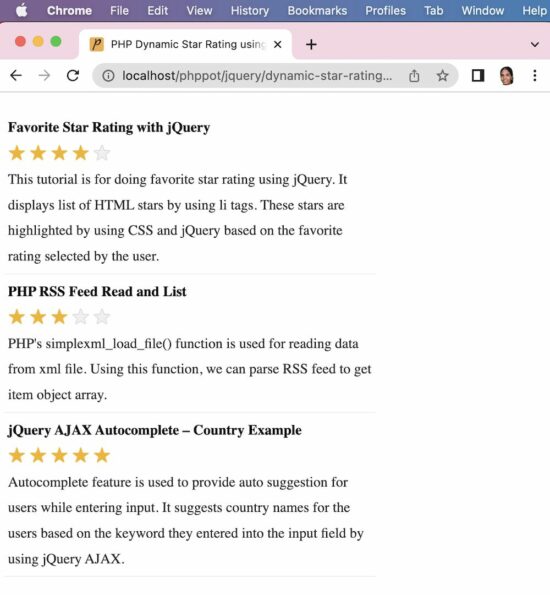
In this PHP tutorial, we are going to list database records and add a dynamic star rating to those records by using jQuery star rating script. We are having a group of stars for each database record.
When we add the rating to a record, an AJAX call will be sent store the current rating to the database.
Display Star Rating for Database Results
This PHP code is for reading the Database results and adding stars for each post result.
On render, the dynamic vote count is used to highlight the number of stars per post.
<?php
require_once ("Rate.php");
$rate = new Rate();
$result = $rate->getAllPost();
?>
<html>
<head>
<title>PHP Dynamic Star Rating using jQuery</title>
<meta name="viewport" content="width=device-width , initial-scale=1.0">
<link href="assets/css/styles.css" rel="stylesheet" type="text/css">
<script src="https://code.jquery.com/jquery-3.6.1.min.js"
integrity="sha256-o88AwQnZB+VDvE9tvIXrMQaPlFFSUTR+nldQm1LuPXQ="
crossorigin="anonymous"></script>
<script type="text/javascript" src="assets/js/rate.js"></script>
</head>
<body>
<table class="demo-table">
<tbody>
<?php
if (! empty($result)) {
$i = 0;
foreach ($result as $tutorial) {
?>
<tr>
<td valign="top">
<div class="feed_title"><?php echo $tutorial["title"];?> </div>
<div id="tutorial-<?php echo $tutorial["id"];?>">
<input type="hidden" name="rating" id="rating"
value="<?php echo $tutorial["rating"]; ?>" />
<ul
onMouseOut="resetRating(<?php echo $tutorial["id"]; ?>);">
<?php
for ($i = 1; $i <= 5; $i ++) {
$selected = "";
if (! empty($tutorial["rating"]) && $i <= $tutorial["rating"]) {
$selected = "selected";
}
?>
<li class='<?php echo $selected;?>'
onmouseover="highlightstar(this,<?php echo $tutorial["id"];?>);"
onmouseout="removeHighlight(<?php echo $tutorial["id"]; ?>);"
onClick="addRating(this,<?php echo $tutorial["id"];?>);">★
</li>
<?php } ?>
<div id="loader-icon">
<img src="loader.gif" id="image-size" />
</div>
</ul>
</div>
<div><?php echo $tutorial["description"]; ?></div>
</td>
</tr>
<?php
}
}
?>
</tbody>
</table>
</body>
</html>
jQuery Functions to Store Rating
In this example code, we have same four jQuery functions. But, we have added additional code for calling PHP via AJAX on clicking rating stars. And also, we have added database row id reference to the “li” selectors for the unique identification of the rating. The functions are,
function highlightStar(obj, id) {

	removeHighlight(id);

	$('.demo-table #tutorial-' + id + ' li').each(function(index) {

		$(this).addClass('highlight');

		if (index == $('.demo-table #tutorial-' + id + ' li').index(obj)) {

			return false;

		}

	});

}


function removeHighlight(id) {

	$('.demo-table #tutorial-' + id + ' li').removeClass('selected');

	$('.demo-table #tutorial-' + id + ' li').removeClass('highlight');

}


function addRating(obj, id) {

	$(obj).parent().find("#loader-icon").css("display", "inline-block");

	$('.demo-table #tutorial-' + id + ' li').each(function(index) {

		$(this).addClass('selected');

		$('#tutorial-' + id + ' #rating').val((index + 1));

		if (index == $('.demo-table #tutorial-' + id + ' li').index(obj)) {

			return false;

		}

	});

	$.ajax({

		url: "add-rating-ajax.php",

		data: 'id=' + id + '&rating=' + $('#tutorial-' + id + ' #rating').val(),

		type: "POST",

		success: function() {

			$(obj).parent().find("#loader-icon").hide();

		}

	});

}


function resetRating(id) {

	if ($('#tutorial-' + id + ' #rating').val() != 0) {

		$('.demo-table #tutorial-' + id + ' li').each(function(index) {

			$(this).addClass('selected');

			if ((index + 1) == $('#tutorial-' + id + ' #rating').val()) {

				return false;

			}

		});

	}

}
PHP MySQL Star Rating Update via AJAX
This PHP code will be executed via an AJAX request. This code runs an update query by receiving id and current rating from AJAX.
<?php

if(!empty($_POST["rating"]) && !empty($_POST["id"])) {

    require_once("Rate.php");

    $rate = new Rate();

    $rate->updateRatingCount($_POST["rating"], $_POST["id"]);

}

?>