 Pb28
Pb28 DropDown with Search using jQuery
Search is a useful feature for an HTML drop-down list. Especially it will increase user convenience to select items from the drop-down having a long list. In this tutorial, we are going to list country dropdowns with a search option. In a previous tutorial, we have seen countries and its dependent dropdown list.
In this tutorial, we are having a list of items in a Javascript array. We are using the jQuery select2 library to supply these list and to display the dropdown with a search.
jQuery Dropdown with Search
This code contains an HTML select element referred by its id. With this id reference, it invokes the select2 function to show this dropdown list with a search box.
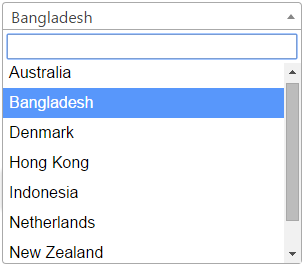
While invoking this function we are passing an array of a country list to the target dropdown element.
<html>

	<head>

		<script src="https://code.jquery.com/jquery-2.1.1.min.js" type="text/javascript"></script>

		<link href="https://cdnjs.cloudflare.com/ajax/libs/select2/4.0.1/css/select2.min.css" rel="stylesheet" />

		<script src="https://cdnjs.cloudflare.com/ajax/libs/select2/4.0.1/js/select2.min.js"></script>

		<script type="text/javascript">

			$(document).ready(function() {

				var country = ["Australia", "Bangladesh", "Denmark", "Hong Kong", "Indonesia", "Netherlands", "New Zealand", "South Africa"];

				$("#country").select2({

				  data: country

				});

			});

		</script>

	</head>

	<body>

		<h1>DropDown with Search using jQuery</h1>

		<div>

			<select id="country" style="width:300px;">

			<!-- Dropdown List Option -->

			</select>

		</div>

	</body>

</html>
We can also pass remote data to the dropdown from the database or any other data source dynamically. There are many options to provide drop-down list search with added features.
For example, we can control the minimum number of input characters we have to type for start searching.