 Pb28
Pb28 Amazon like Product Category Tree
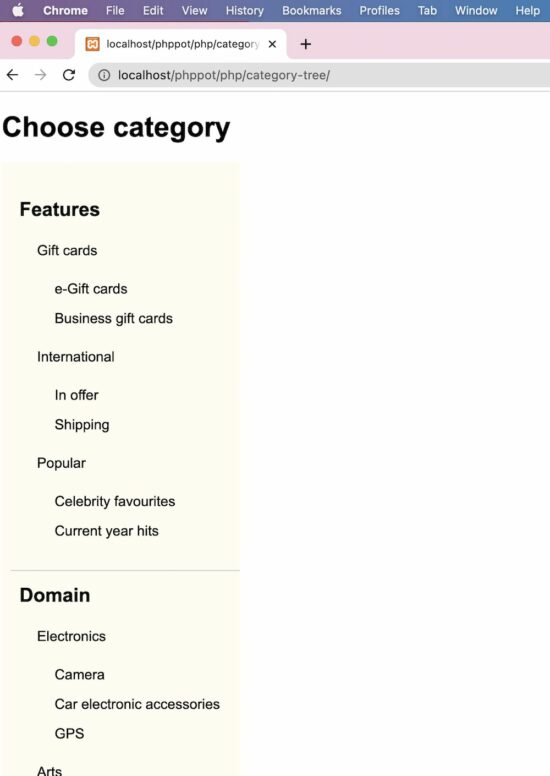
This PHP script will help if you want to display an Amazon-like product category tree. It will be useful for displaying the category menu in a hierarchical order, just like a tree.
The specialty of this PHP code is that it builds a multi-level category tree with infinite depth. It uses the recursion method to obtain this.
In a previous tutorial, we have to see a multilevel dropdown menu with a fixed depth.
Let’s look into the upcoming sections to see how the code is built to display the category tree in a page.
Category Database
This script contains the category database with data. The insert query creates category records which are mapped with its parent appropriately.
The category records containing parent=0 are known as the main category. Each record has the sort order to set the display priority on the UI.
CREATE TABLE `category` (

  `id` int(10) UNSIGNED NOT NULL,

  `category_name` varchar(50) COLLATE utf8mb4_unicode_ci NOT NULL,

  `parent` int(10) UNSIGNED NOT NULL DEFAULT 0,

  `sort_order` int(11) NOT NULL DEFAULT 0

);


--

-- Dumping data for table `category`

--


INSERT INTO `category` (`id`, `category_name`, `parent`, `sort_order`) VALUES

(1, 'Features', 0, 0),

(2, 'Domain', 0, 1),

(3, 'Digital', 0, 2),

(4, 'Gift cards', 1, 0),

(5, 'International', 1, 1),

(6, 'Popular', 1, 2),

(7, 'e-Gift cards', 4, 0),

(8, 'Business gift cards', 4, 1),

(9, 'In offer', 5, 0),

(10, 'Shipping', 5, 1),

(11, 'Celebrity favourites', 6, 0),

(12, 'Current year hits', 6, 1),

(13, 'Electronics', 2, 0),

(14, 'Arts', 2, 1),

(15, 'Gadgets', 2, 2),

(16, 'Camera', 13, 0),

(17, 'Car electronic accessories', 13, 1),

(18, 'GPS', 13, 2),

(19, 'Handcrafted', 14, 0),

(20, 'Gold enameled', 14, 1),

(21, 'Jewelry', 14, 2),

(22, 'Fabric', 19, 0),

(23, 'Needle work', 19, 1),

(24, 'PSP', 15, 0),

(25, 'Smart phones', 15, 1),

(26, 'Apps', 3, 0),

(27, 'Music', 3, 1),

(28, 'Movies', 3, 2),

(29, 'Dev apps', 26, 0),

(30, 'App Hardwares', 26, 1),

(31, 'Podcasts', 27, 0),

(32, 'Live', 27, 1),

(33, 'Recently viewed', 28, 0),

(34, 'You may like', 28, 1),

(35, 'Blockbusters', 28, 2);


--

-- Indexes for dumped tables

--


--

-- Indexes for table `category`

--

ALTER TABLE `category`

  ADD PRIMARY KEY (`id`);


--

-- AUTO_INCREMENT for dumped tables

--


--

-- AUTO_INCREMENT for table `category`

--

ALTER TABLE `category`

  MODIFY `id` int(10) UNSIGNED NOT NULL AUTO_INCREMENT, AUTO_INCREMENT=36;
Category menu rendering in HTML
This is an initiator that calls the PHP recursive parsing to get the Category Tree HTML. In the PHP ZipArchive post, we used the same recursion concept to compress the contents of the enclosed directories.
Also, it has a UI holder to render the HTML hierarchical category menu.
A PHP class CategoryTree is created to read and parse the category array from the database.
<!DOCTYPE html>

<html lang="en">

<head>

<meta name="viewport" content="width=device-width, initial-scale=1.0">

</head>

<body>

<?php

require_once __DIR__ . '/CategoryTree.php';

$categoryTree = new CategoryTree();

$categoryResult = $categoryTree->getCategoryResult();

?>

<h1>Choose category</h1>

    <div class="category-menu">

<?php

echo $categoryTree->getCategoryTreeHTML($categoryResult);

?>

</div>

</body>

</html>
This styles gives the category tree a pleasing look. Since it displays an infinite level of child categories, this CSS will help to rectify the default UI constraints.
body {

    font-family: Arial;

    margin-left: 10px;

    margin-right: 20px;

}


ul.category-container li {

    list-style: none;

    padding-left: 10px;

    width: 100%;

}


.category-container a {

    text-decoration: none;

    color: #000;

}


.parent-depth-0 {

    font-size: 22px;

    font-weight: bold;

    border-bottom: #ccc 1px solid;

    padding: 15px 0px 15px 0px;

}


.parent-depth-all {

    font-size: 16px;

    padding-top: 15px;

    font-weight: normal;

}


.no-child {

    font-size: 16px;

    font-weight: normal;

    padding: 15px 0px 0px 0px;

}


.category-menu {

    width: 270px;

    overflow-y: scroll;

    max-height: 800px;

    background: #fffcf2;

    padding: 0px;

}


ul.category-container {

    padding: 10px;

}
Read category data and build in tree format
This is the main PHP class that reads the dynamic categories from the database.
The getCategoryTreeHTML the function parses the category result array. It recursively calls and parses the levels of category by its parent.
In WordPress, there is a category walker to parse the terms and taxonomies. We have created a custom WordPress walker to parse categories efficiently.
It sets the argument parent=0 to build parent-level category menu items.
The resultant category tree HTML will be a nested UL-LI list to show the multi-level menu.
<?php


class CategoryTree

{


    private $connection;


    function __construct()

    {

        $this->connection = mysqli_connect('localhost', 'root', '', 'db_category_tree');

    }


    function getCategoryTreeHTML($category, $parent = 0)

    {

        $html = "";

        if (isset($category['parentId'][$parent])) {

            $html .= "<ul class='category-container'>\n";

            foreach ($category['parentId'][$parent] as $cat_id) {

                if (! isset($category['parentId'][$cat_id])) {

                    $child = "";

                    if ($category['categoryResult'][$cat_id]['parent'] != 0) {

                        $child = "no-child";

                    }

                    $html .= "<li class= '$child " . "parent-" . $category['categoryResult'][$cat_id]['parent'] . "' >\n" . $category['categoryResult'][$cat_id]['category_name'] . "</li> \n";

                }

                if (isset($category['parentId'][$cat_id])) {

                    $parentDepth0 = "parent-depth-all";

                    if ($category['categoryResult'][$cat_id]['parent'] == 0) {

                        $parentDepth0 = "parent-depth-0";

                    }

                    $html .= "<li class= '$parentDepth0 " . 'parent-' . $category['categoryResult'][$cat_id]['parent'] . "'>\n " . $category['categoryResult'][$cat_id]['category_name'] . " \n";

                    $html .= $this->getCategoryTreeHTML($category, $cat_id);

                    $html .= "</li> \n";

                }

            }

            $html .= "</ul> \n";

        }

        return $html;

    }


    function getCategoryResult()

    {

        $query = "SELECT * FROM category ORDER BY parent, sort_order";

        $result = mysqli_query($this->connection, $query);


        $category = array();


        while ($row = mysqli_fetch_assoc($result)) {

            $category['categoryResult'][$row['id']] = $row;

            $category['parentId'][$row['parent']][] = $row['id'];

        }


        return $category;

    }

}

?>
Where category tree code can be used?
The category tree is used in many places. For example, most shopping cart websites have a category filter or menu to classify the showcase products.
The Amazon shop’s category menu ads value to the end user to narrow down the vast area to find their area of interest.
Also, tutorial websites display the table of contents in the form of a tree order.